
Web development is a dynamic field. Developers need the right tools to excel.
In the ever-evolving world of web development, having the right tools can make a significant difference. These tools help streamline workflows, enhance productivity, and ensure code quality. Whether you’re a seasoned developer or just starting out, knowing which tools to use is crucial.
This blog post will explore some of the top development tools that can aid web developers in their projects. From coding environments to debugging tools, each serves a unique purpose. Let’s dive in and discover which tools can help you create efficient and robust web applications.
Code Editors
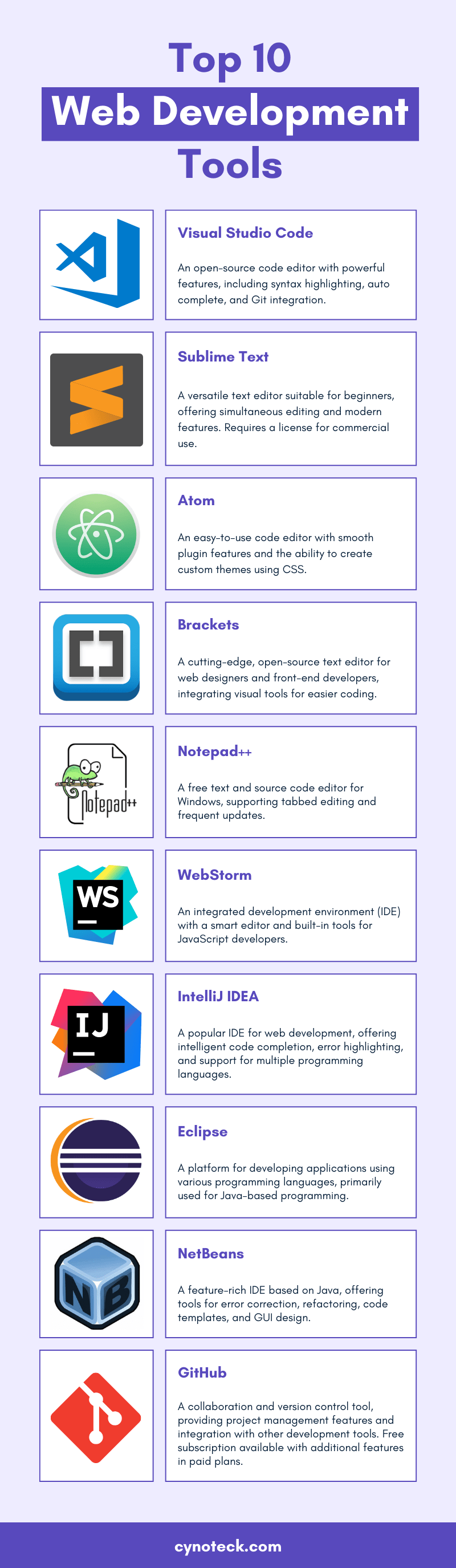
Choosing the right code editor is crucial for web developers. It can greatly impact your productivity and efficiency. Let’s dive into some of the top code editors that you should consider using.
Visual Studio Code
Visual Studio Code (VS Code) is a favorite among developers. It is free, open-source, and packed with features. You will love its built-in Git support and debugging tools.
VS Code also offers a vast library of extensions. These extensions can help you customize your development environment. You can add support for almost any programming language.
Personally, I find the IntelliSense feature extremely helpful. It provides smart completions based on variable types, function definitions, and imported modules. Have you tried this feature yet?
Sublime Text
Sublime Text is known for its speed and simplicity. It is a lightweight code editor with a minimalistic design. If you value performance, this might be your go-to tool.
Although it is not free, many developers find it worth the investment. Sublime Text supports multiple cursors, allowing you to make changes to several lines at once. This can save you a lot of time.
One of my favorite features is the “Goto Anything” command. It lets you quickly navigate to files, symbols, or lines. Have you ever used a tool that lets you jump around your code so effortlessly?
Atom
Atom is another popular choice, especially for those who love customization. It is free and open-source, developed by GitHub. Atom is built with web technologies like HTML, JavaScript, and CSS.
You can tweak Atom to fit your needs with various themes and plugins. The community around Atom is very active, so you will find plenty of resources and support.
One thing I appreciate about Atom is its collaboration feature. Teletype for Atom allows you to share your workspace with others in real-time. Imagine the possibilities for remote teamwork!
Choosing the right code editor is a personal decision. What works best for one developer might not work for another. Try out these tools and see which one fits your workflow the best. Happy coding!
Version Control Systems
Version Control Systems are essential for web developers. They help manage changes in code and collaborate efficiently. These tools track modifications, allowing developers to revert to previous versions if needed. Here are some top version control systems that web developers use.
Git
Git is a powerful and widely-used version control system. It offers distributed version control, meaning every developer has a copy of the repository. Git supports branching and merging, which helps in managing different versions of code. It’s fast and efficient, making it a favorite among developers.
Github
GitHub is a popular platform for hosting Git repositories. It provides a web-based interface that simplifies collaboration. Developers can share their code, track issues, and discuss changes. GitHub also offers integration with various tools and services, enhancing the development process.
Gitlab
GitLab is another robust platform for Git repositories. It offers features similar to GitHub but with additional tools for continuous integration and deployment. GitLab allows developers to automate testing and deployment, improving the workflow. It also provides detailed analytics, helping teams monitor progress.
Package Managers
When developing websites or applications, managing your code and its dependencies efficiently is crucial. That’s where package managers come in handy. They help you manage libraries, frameworks, and other tools, ensuring your project runs smoothly. Let’s dive into some of the top package managers you should know.
Npm
npm (Node Package Manager) is the default package manager for Node.js. It’s one of the most popular tools for web developers. With over 1.3 million packages available, npm has a library for nearly anything you need.
Using npm can save you a lot of time. Instead of writing code from scratch, you can install a package and get back to more important tasks. For instance, I once needed a date picker for a project. I found several options on npm and integrated one in minutes.
Have you ever found yourself stuck on a problem for hours? You might find a package on npm that solves it instantly. It’s like having a toolbox with a solution for almost every issue you might face.
Yarn
Yarn is another package manager you might find useful. It’s known for its speed and reliability. Yarn caches every package it downloads, so it never needs to download the same package again. This makes subsequent installs lightning fast.
One thing I appreciate about Yarn is its focus on security. It verifies the integrity of every package before it’s used. This can give you peace of mind, knowing that the packages you install are safe.
Have you ever worried about breaking changes when updating a package? Yarn’s version control and lock files can help manage dependencies effectively, ensuring your project remains stable.
Bower
Bower is another package manager, though it’s more focused on front-end packages. It’s designed to manage components like HTML, CSS, JavaScript, and fonts. Bower works well for projects that need specific front-end libraries.
In my experience, Bower is straightforward and easy to use. When I was working on a legacy project, Bower was a lifesaver. It helped me quickly add the required libraries without any hassle.
However, it’s worth noting that Bower has been deprecated in favor of newer tools like npm and Yarn. But if you’re maintaining older projects, Bower can still be quite useful.
So, which package manager do you prefer? Each has its strengths and can be the perfect fit depending on your project needs. Try them out and see which one works best for you!
Task Runners
Task runners automate repetitive tasks in web development. They improve workflow efficiency by handling tasks like minification and compilation. Popular options include Gulp and Grunt.
Task runners are essential tools for web developers. They automate repetitive tasks, saving you time and effort. With task runners, you can streamline your workflow and focus on coding.Gulp
Gulp is a popular task runner. It uses Node.js and a simple code syntax. You can automate tasks like minifying CSS, JavaScript, and images. I remember when I first used Gulp for a project. It drastically reduced the time spent on manual tasks. I could quickly set up tasks with just a few lines of code. Do you want to speed up your development process? Gulp might be the tool for you.Grunt
Grunt is another powerful task runner. It has a vast ecosystem with plugins for almost any task. You define tasks in a configuration file. Grunt was my go-to tool in my early web development days. Its large community helped me find solutions to issues easily. It’s flexible and reliable. Is your project complex and needs multiple tasks? Grunt could be your perfect match.Webpack
Webpack is more than just a task runner. It’s a module bundler. It manages dependencies and optimizes your code. Webpack became my favorite after working on a large-scale project. It handled everything from code splitting to hot module replacement. The performance boost was significant. Are you working on a big project with many dependencies? Webpack can simplify your workflow. Task runners can transform your development process. They automate tasks, save time, and improve efficiency. Which one will you try first?Css Preprocessors
CSS preprocessors are tools that help developers write cleaner, more readable code. They extend the capabilities of CSS by introducing variables, nested rules, and functions. These features make it easier to maintain and scale projects. Let’s dive into three popular CSS preprocessors: Sass, Less, and Stylus.
Sass
Sass, or Syntactically Awesome Style Sheets, is one of the most popular CSS preprocessors. It allows you to use variables, nested rules, and mixins. These features make your CSS more organized and easier to manage. You can also create reusable snippets of code. This saves time and ensures consistency. Sass files have the .scss or .sass extension.
Less
Less, short for Leaner Style Sheets, is another widely used CSS preprocessor. It offers similar features to Sass, like variables, nesting, and mixins. Less files use the .less extension. One unique feature of Less is the ability to perform calculations. This can help with tasks like setting widths and margins. Less compiles directly into CSS, ensuring your styles are compatible with all browsers.
Stylus
Stylus is a powerful CSS preprocessor known for its flexibility. It supports variables, mixins, and nested rules. Stylus files can have .styl extension. One standout feature is its ability to omit colons and semicolons. This makes your code cleaner and easier to read. Stylus also supports advanced functions and logic. This allows for more dynamic styling options.
Credit: www.reddit.com
Frontend Frameworks
When it comes to creating stunning and interactive web applications, frontend frameworks are your best friends. They provide the foundation and tools you need to build responsive and dynamic user interfaces. Let’s dive into three of the most popular frontend frameworks: React, Angular, and Vue.js.
React
React, developed by Facebook, is a powerful and flexible JavaScript library for building user interfaces. It allows you to create reusable UI components, making your code more manageable and easier to maintain.
One of the standout features of React is its virtual DOM. This improves performance by updating only the parts of the DOM that have changed. Imagine you have a large list of items, and you only need to update one item. React ensures that only that specific item is re-rendered, not the entire list.
If you’re new to React, start with the official documentation and tutorials. They provide a step-by-step guide to help you get up and running quickly. You’ll be surprised at how quickly you can build sophisticated UIs.
Angular
Angular, maintained by Google, is a robust framework for building client-side applications. It provides a comprehensive solution with built-in tools for routing, state management, and form handling.
Angular uses TypeScript, a statically typed superset of JavaScript. This means you get the benefits of type-checking and better tooling support. If you’re coming from a Java or C# background, you’ll appreciate the strong typing and object-oriented features.
One thing to consider is Angular’s learning curve. It can be steep, especially if you’re new to TypeScript or the framework’s concepts. But once you get the hang of it, you’ll find that Angular’s structure makes large-scale applications more maintainable.
Vue.js
Vue.js is a progressive framework for building user interfaces. It’s designed to be incrementally adoptable, meaning you can use as much or as little of Vue as you need.
Vue’s simplicity and ease of integration are its biggest strengths. You can start by adding Vue to an existing project and gradually introduce more features. This makes it a great choice for projects of any size.
One of my favorite features of Vue is its single-file components. They encapsulate HTML, CSS, and JavaScript into a single file, making your codebase clean and easy to navigate. If you value simplicity and flexibility, give Vue a try.
Which frontend framework do you think suits your needs the most? Each has its unique strengths, and the best choice depends on your project requirements and personal preferences. Explore and experiment to find the perfect fit for you.
Backend Frameworks
Backend frameworks play a crucial role in web development. They help build the server-side of web applications. These frameworks provide tools and libraries to simplify development. Let’s explore three top backend frameworks: Node.js, Django, and Ruby on Rails.
Node.js
Node.js is a popular backend framework. It uses JavaScript, which is easy to learn. Node.js is known for its speed and efficiency. It runs on the V8 engine, which powers Google Chrome. This framework is perfect for building scalable network applications. Many developers love Node.js for its non-blocking I/O model. It handles multiple connections at once. This makes it ideal for real-time applications like chat apps.
Django
Django is a high-level backend framework. It is written in Python. Django promotes rapid development. It has a clean and pragmatic design. Django includes many built-in features. These features reduce the need for third-party plugins. It uses the “don’t repeat yourself” principle. This means you write less code, which saves time. Django is great for building secure and maintainable websites. Many large websites use Django, including Instagram and Pinterest.
Ruby On Rails
Ruby on Rails, often called Rails, is a powerful backend framework. It is written in Ruby. Rails follow the convention over configuration principle. This means it makes many decisions for you. It speeds up the development process. Rails have a large and active community. This means you can find support easily. It is known for its simplicity and ease of use. Rails are perfect for building complex web applications quickly.
Credit: cynoteck.com
Testing Tools
As a web developer, ensuring your code works flawlessly across different scenarios is crucial. This is where testing tools come into play. These tools help you catch bugs before they reach your users. Let’s dive into some of the top testing tools you should consider adding to your toolkit.
Jest
Jest is a powerful JavaScript testing framework developed by Facebook. It’s great for testing React applications but works with any JavaScript project. The best part? Jest is easy to set up and requires minimal configuration.
One of its standout features is snapshot testing. This allows you to capture the rendered output of your React components and compare them to a reference snapshot. If changes occur, you will be alerted. This makes it perfect for ensuring your UI remains consistent.
You can run tests in parallel, which speeds up the testing process. Jest’s built-in mocking capabilities are also worth mentioning. They help you simulate different scenarios and ensure your code handles them correctly.
Mocha
Mocha is another popular JavaScript testing framework. It’s flexible and allows you to choose your assertion library. Many developers pair it with Chai for a powerful combination.
Mocha runs tests asynchronously, which is ideal for testing APIs or other async operations. Its descriptive syntax makes it easy to write and understand tests, even for beginners.
One of the things I love about Mocha is its detailed reports. They help you quickly identify failing tests and understand what’s going wrong. Mocha’s community is also very active, so you’ll find plenty of plugins and extensions to enhance your testing experience.
Selenium
Selenium is the go-to tool for automating web browsers. If you need to test how your application behaves in different browsers, Selenium is your best friend. It’s compatible with various programming languages, including JavaScript, Python, and Java.
With Selenium, you can write scripts to simulate user interactions like clicking buttons, filling out forms, and navigating through pages. This is invaluable for end-to-end testing.
One challenge with Selenium is setting up the environment. However, once configured, it can save you a lot of time and headaches. Have you ever pushed a change live only to find it breaks in a specific browser? Selenium can help you catch these issues early.
Testing tools are essential for delivering reliable and high-quality applications. By incorporating tools like Jest, Mocha, and Selenium into your workflow, you can ensure your code performs as expected. What testing tools have you found indispensable in your development process?
Project Management Tools
Effective project management is crucial for web developers. It ensures tasks are organized and deadlines are met. Project management tools help streamline this process. They offer features to track progress, assign tasks, and collaborate with team members.
Trello
Trello is a popular choice among web developers. It uses boards, lists, and cards to organize projects. Each card represents a task. You can add due dates, attachments, and comments to cards. Trello’s interface is user-friendly. It helps visualize the workflow. You can drag and drop cards to different lists. This makes task management simple.
Jira
JIRA is designed for software development. It offers advanced project tracking features. You can create issues, track bugs, and manage sprint planning. JIRA integrates with various development tools. This makes it ideal for agile teams. It provides detailed reports and dashboards. These help monitor progress and identify bottlenecks.
Asana
Asana is another excellent project management tool. It allows you to create tasks and subtasks. You can assign them to team members. Asana supports timeline views and calendar integration. This helps in scheduling and tracking deadlines. It also offers collaboration features. Team members can comment on tasks and share files. Asana’s clean interface makes it easy to use.
Credit: www.browserstack.com
Collaboration Tools
Collaboration tools have become an essential part of a web developer’s toolkit. Whether you are working in a team or with clients, the right tool can make all the difference in communication and productivity. Let’s dive into some of the top collaboration tools that can enhance your workflow.
Slack
Slack is a popular messaging platform that allows teams to communicate in real-time. It’s user-friendly, and you can create different channels for various projects or topics. The ability to integrate with other tools like GitHub, Trello, and Google Drive makes it even more powerful.
Imagine quickly sharing code snippets or project updates without the clutter of long email chains. Slack’s search function also helps you find past conversations and files effortlessly. If you haven’t tried Slack yet, it’s definitely worth exploring for its seamless communication features.
Microsoft Teams
Microsoft Teams is another robust tool for team collaboration. It offers chat, video meetings, and file sharing all in one place. If your team is already using Microsoft Office 365, integration with Teams is smooth and adds extra functionality.
From scheduling meetings to collaborating on documents in real-time, Microsoft Teams can streamline your workflow. You can also use it to connect with external partners, making it versatile for various collaboration needs. Have you considered how integrating all your tools in one platform could save you time?
Zoom
Zoom has become synonymous with video conferencing. It’s simple to use and provides high-quality video and audio calls. Whether you are conducting a team meeting, a client presentation, or a quick check-in, Zoom’s features ensure clear communication.
With screen sharing, virtual backgrounds, and breakout rooms, Zoom offers everything you need for effective virtual meetings. The recording feature is particularly useful for revisiting discussions or sharing with team members who couldn’t attend. Could Zoom be the answer to your remote communication challenges?
Choosing the right collaboration tool can significantly impact your team’s productivity and communication. Whether it’s Slack, Microsoft Teams, or Zoom, each offers unique features that can cater to different needs. Don’t just take my word for it—try them out and see which one fits best with your team’s workflow.
Frequently Asked Questions
What Are The Best Dev Tools For Web Development?
The best web development tools include Visual Studio Code, GitHub, Chrome DevTools, Node. js, and Sass. These tools enhance productivity and streamline workflows.
What Are The Tools Used In Web Development?
Web development tools include HTML, CSS, JavaScript, frameworks like React and Angular, and version control systems like Git. Popular text editors are VS Code and Sublime Text.
Which Software Is Most Used For Web Development?
The most used software for web development includes HTML, CSS, JavaScript, and frameworks like React, Angular, and Vue. js.
What Ide Do Most Web Developers Use?
Most web developers use Visual Studio Code due to its extensive features, customization options, and strong community support.
Conclusion
Choosing the right tools can improve web development skills. The tools mentioned simplify coding, debugging, and designing. Each tool offers unique features for various tasks. Experiment with different tools to find the best fit. Efficient tools make development faster and more enjoyable.
Stay updated on new tools to enhance productivity. Happy coding!